
Patient help
How to view and share your results
Your radiologist's report, your scan images and your blood test results are all available online. This guide shows you how to open them on your phone or computer, and how you can share your results with healthcare providers.
Watch
Video guides
Each video is about a minute long, with subtitles.
Quickest way
Open your results from our email
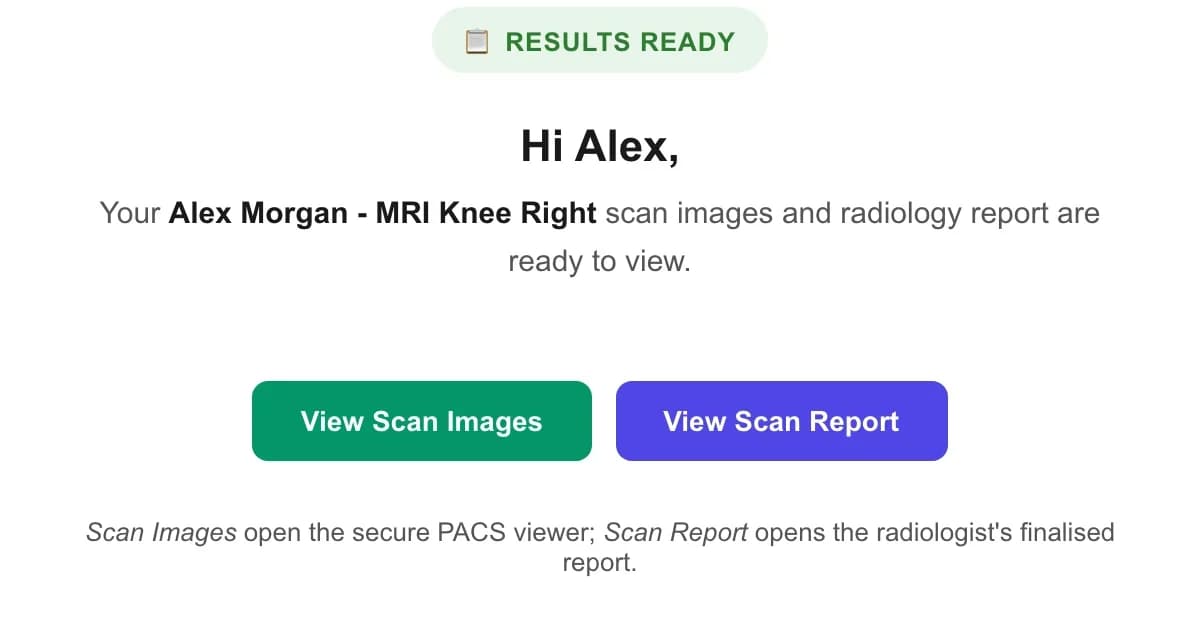
When your results are ready we send you an email. The links in it open your results straight away, with no password needed.
Find the email from MyScanHub
For scans, the subject is “Your Scan Images and Report Are Ready”. For blood tests, it is “Your Blood Test Results Are Ready”. If you can't see it, check your junk or spam folder.
Tap a button to open your results
View Scan Report opens your radiologist's report. View Scan Images opens your scans in our image viewer. For blood tests, View / Download Results (PDF) opens your results as a PDF. If you had more than one scan, there is a separate report button for each one.
Print or save your report
At the top of the report there is a Print button. To keep a copy, choose Save as PDF in the print window.
Any time
View your results in your MyScanHub account
All your results are kept in your account, so you can come back to them whenever you need to.
Sign in
Go to myscanhub.com/login. Sign in with your email and password, or enter your email under “Sign in with a one-time link” and tap Email me a sign-in link. We'll email you a link that signs you in, and it works for 15 minutes.
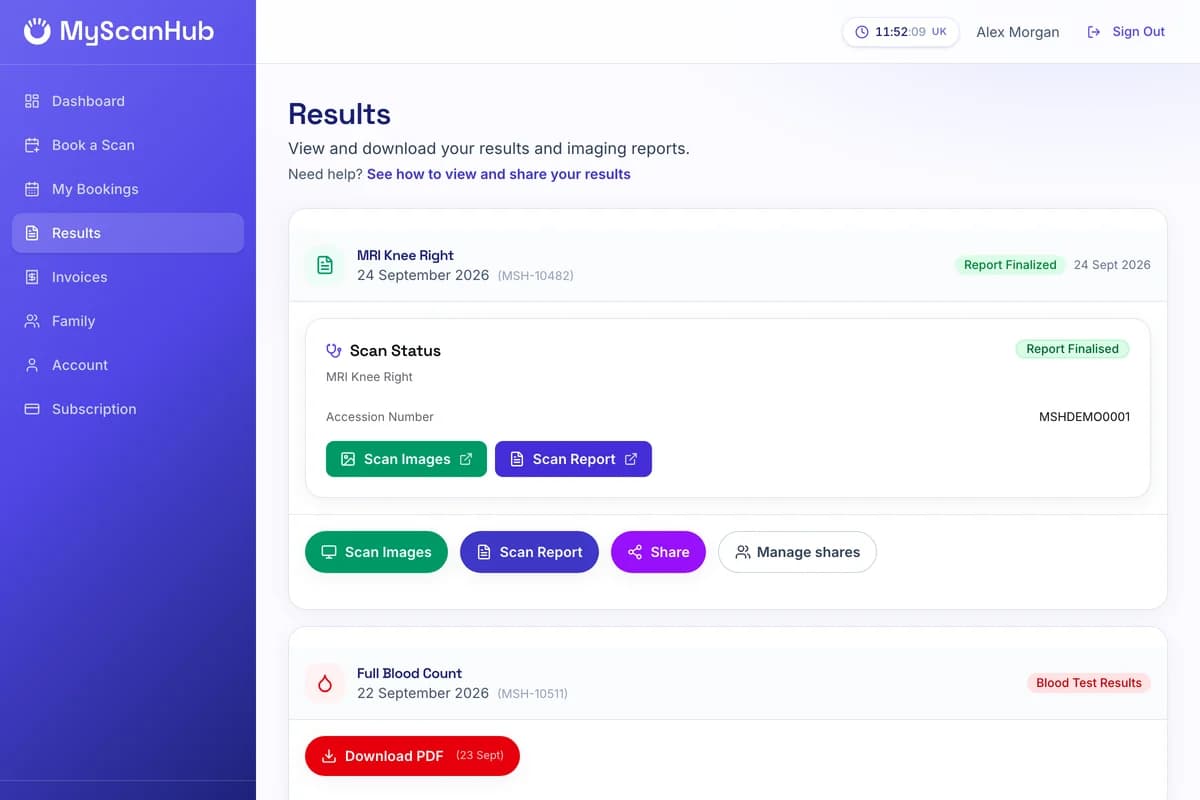
Choose Results from the menu
On a phone, open the menu first. Each of your appointments is shown on its own card.
Open what you need
Scan Report opens the radiologist's report, Scan Images opens your scans, and Download PDF saves your blood test results. If the card says the report is being prepared, it isn't ready yet, and we'll email you when it is.
Send to your doctor
Share your results with your GP
The safest way is the Share button in your account. Your GP gets an email with a private link, and you decide what they can see and for how long. They don't need a MyScanHub account.
Sign in and go to Results
Then tap Share on the scan you want to send.
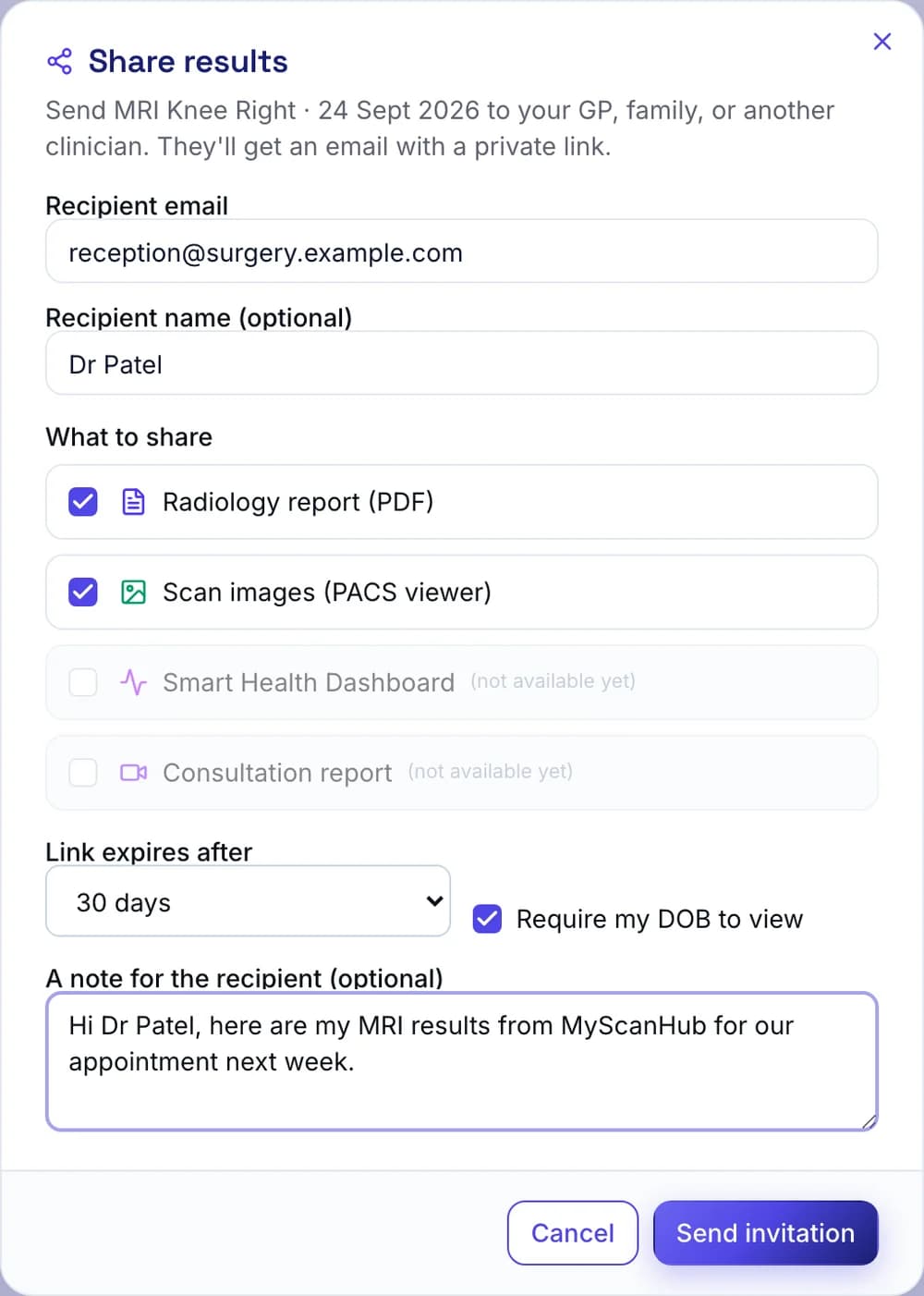
Enter your GP's details
Type your GP practice's email address and, if you like, the doctor's name. Your GP surgery's reception can tell you the best email address to use.
Choose what to share
Tick Radiology report (PDF), Scan images, or both.
Choose how long the link works
Pick 7, 30 or 90 days, or no expiry. For extra security, tick Require my DOB to view, and your GP will need your date of birth to open it.
Add a note and send
Add a short message if you like, then tap Send invitation. You can also tap Copy to copy the link and send it yourself.
Other ways to share
- Blood test results: tap Download PDF, then attach the PDF to an email to your GP practice.
- From the report itself: open your report and tap Share at the top. On a phone this opens your phone's sharing options. On a computer it copies the link, ready to paste into an email. Anyone with this link can read the report, so only send it to people you trust.
- As a PDF: open your report, tap Print, choose Save as PDF, and attach the file to an email.
You're in control
See who you've shared with, or stop sharing
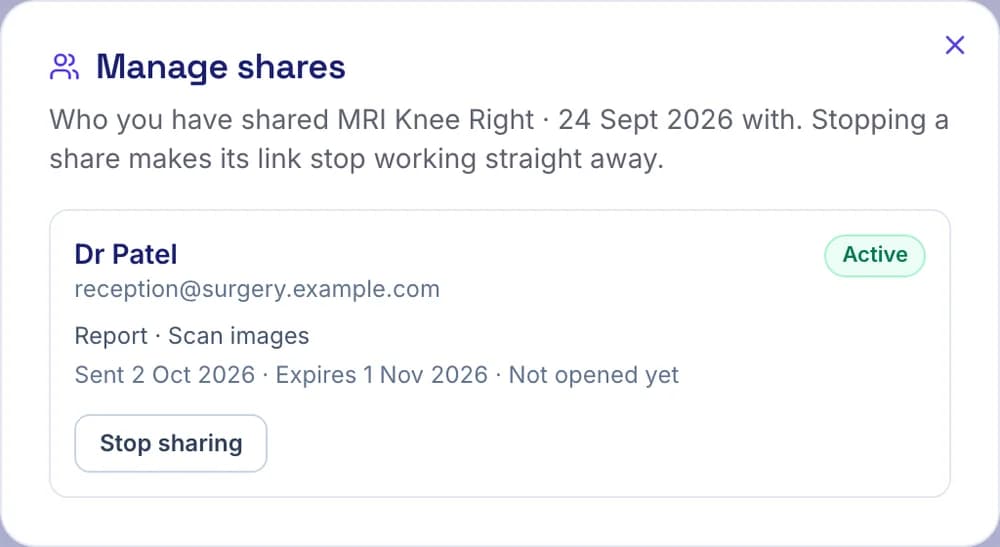
Go to Results and tap Manage shares
You'll see everyone you have shared that result with, what you shared, when the link expires and how many times it has been opened.
Tap Stop sharing
Confirm, and that link stops working straight away. You can always share again later.
Help
Problems and questions
I haven't received my results email.
We email you as soon as your results are ready. Please check your junk or spam folder for an email from MyScanHub, and make sure we have the right email address. You can also sign in to your account and look under Results. If your results still aren't there, call us on 0800 151 2227.
I don't know my password.
You don't need one. On the sign-in page, enter your email under “Sign in with a one-time link” and tap “Email me a sign-in link”. The link works for 15 minutes. You can also use “Forgot password?” to set a new password.
My Results page says the report is being prepared.
Your scan has been done but the radiologist's report isn't ready yet. The buttons appear on the Results page, and we email you, as soon as it is.
The scan images won't open or look very small on my phone.
Scan images open in a specialist image viewer, which works best on a computer or tablet. On a phone, try turning it sideways or opening the link in a different browser, such as Chrome or Safari.
How do I download my scan images?
Open your scan images from our email or the Results page in your account, then click the download button below your scan's image series on the left of the viewer. When the download is ready in the Download List at the bottom left, click the download icon next to it. Your images save as a ZIP file in DICOM format, which you can open with a DICOM viewer or give to your doctor. This works best on a computer.
Can my GP open my results without a MyScanHub account?
Yes. When you use Share, your GP gets an email with a private link and doesn't need an account. If you ticked “Require my DOB to view”, they will also need your date of birth.
My GP says the link has expired.
Shared links stop working after the time you chose (7, 30 or 90 days), or straight away if you stopped sharing. Just use Share again to send a new link.
Can I forward the results email to my GP?
Please don't. Anyone with the links in that email can open your results, so they are meant for you only. Use the Share button instead, which lets you choose who gets access, for how long, and stop it at any time.
How do I share my blood test results?
Tap Download PDF next to your blood test on the Results page, or in your results email, then attach the PDF to an email to your GP practice.
Still need help?
Call us on 0800 151 2227 or email [email protected]. We're happy to talk you through it.